The repetitive week is a design problem
Every Monday, in every time zone where our deals run, from Mexico City to Bogotá to Quito, the same quiet ritual repeats. Before the first coffee is finished, someone rebuilds a performance report by hand, rewrites a status update from memory, retypes meeting notes while the meeting still runs, and trades ten messages to find one meeting slot.
None of these acts is difficult. All of them are expensive
After more than twenty years moving between product design, business development, and deal leadership across Latin America, I have come to see the repetitive week not as a personal discipline problem but as a design problem. And design problems have design solutions.
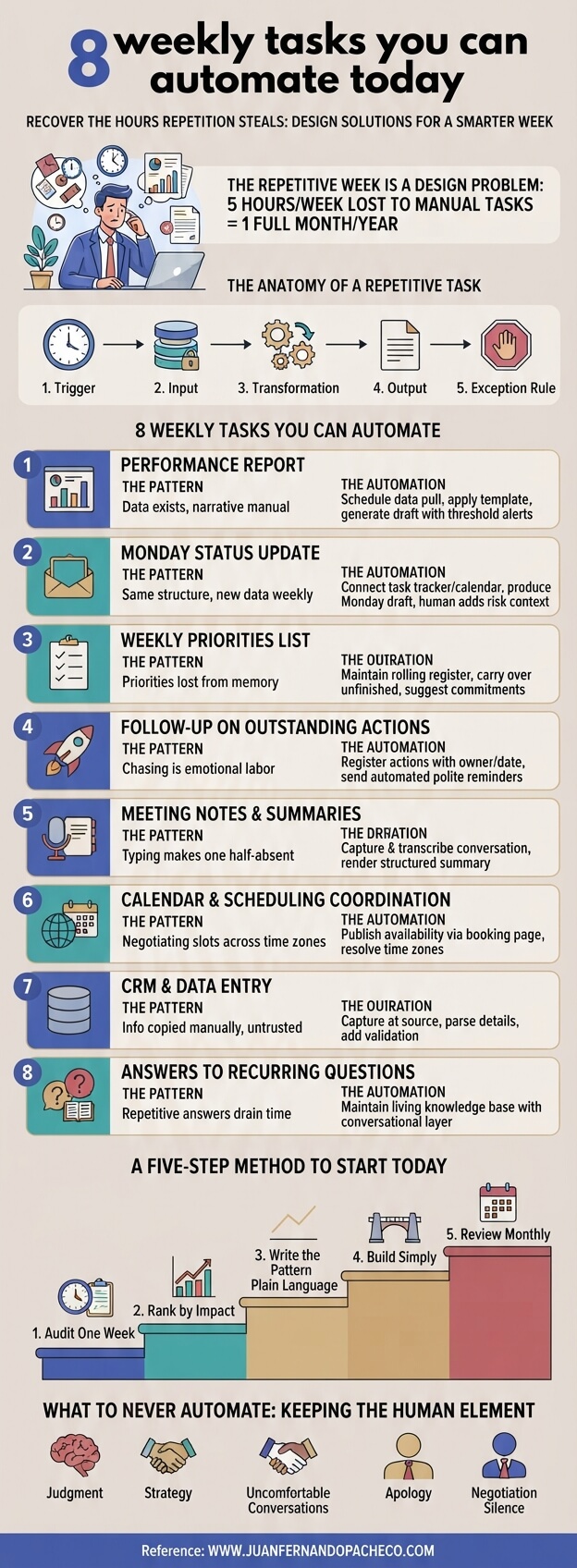
A simple visual I keep coming back to lists eight weekly tasks that almost every knowledge worker repeats by hand:
- The performance report,
- The status update,
- The priorities list,
- The follow-ups,
- The meeting notes,
- The scheduling,
- The CRM entry, and
- The answers to recurring questions.
What strikes me is not the list itself but its stability
I have watched the same eight tasks consume the weeks of sales teams, delivery teams, and procurement teams for my entire career, through every generation of software. That stability is the clue. These are not tool problems. They are pattern problems, and patterns, unlike tools, can be automated once and kept for years.
This post is written to age well on purpose
It will not recommend a single fashionable application, because applications come and go. Instead, it gives you the pattern behind each of the eight tasks, a five-step method to automate any of them, and the discipline to keep them automated.
The promise is commercial and human at the same time: recover the hours that repetition steals, and reinvest them in judgment, relationships, and strategy, the things that actually close deals and build careers.
Why the repetitive week is so expensive
Let me put numbers on it, because vague pain gets vague fixes. The eight tasks rarely cost less than four to six hours per week for an individual professional, and for deal leaders and managers they routinely cost more. Take five hours as a conservative figure.
Five hours a week is roughly one full working day every week, around 250 hours a year, and more than 1,200 hours across five years: The equivalent of several months of working days spent re-typing information that already exists in a system somewhere.
- The direct cost, however, is only the visible part.
- The hidden costs are worse, and they compound.
- The quality cost. A report built by hand carries manual errors, and a priorities list rewritten from memory silently drops last week’s context. The output is not only slow; it is unreliable, and unreliable information produces unreliable decisions.
- The attention cost. Every switch into coordination fragments the deep work where real analysis happens. You cannot hold a pricing model in your head while negotiating a calendar slot, and the residue of that switching follows you for the rest of the day.
- The revenue cost. In enterprise sales and in high-stakes RFx execution, the scarce resource is not effort; it is timely attention to the few variables that move the outcome.
Every hour spent on transcription is an hour not spent on the client, the competitor, or the risk that will actually decide the deal.
Research has pointed in this direction for more than a decade
Studies of how knowledge workers spend their time consistently find that a striking share of the week goes to “work about work”: chasing updates, searching for documents, coordinating across tools.
One line of research found employees spend close to two hours every day simply searching for and gathering information, and a recent industry index suggests that around sixty percent of the week can dissolve into coordination and reporting rather than skilled work.
That is not a productivity gap. That is a design flaw in how we run the week.
A lens that stays useful when tools change
Tools will keep changing; that is the one certainty
What does not change is the anatomy of a repetitive task. Every one of the eight tasks has the same skeleton:
- A trigger. Monday at eight, the moment a meeting ends, the arrival of a request.
- An input. Data that already lives somewhere: A CRM, a task tracker, a calendar, a transcript, a knowledge base.
- A transformation. A predictable reshaping of that data into a format: a report, a summary, a list, a reply.
- An output. A destination and an audience: An inbox, a channel, a document, a record.
- An exception rule. What happens when something is unusual, and when a human must step in.
When you write a task in this language, two things become obvious.
- First, most of the work is mechanical, and therefore automatable with any generation of technology, from humble email rules to modern assistants.
- Second, the small part that is not mechanical- the judgment- is exactly what the human should keep.
The evergreen move is to automate the pattern, not the app. The app you use this year will be replaced; the pattern you write down this year will still be true in five.
The eight weekly tasks you can automate, read as patterns
1. The weekly performance report
The pattern: the data already exists in your systems; only the narrative and the distribution are manual. The failure mode is the one the visual names so well: built by hand and read by nobody. When a report costs an hour to assemble, you assemble it for compliance rather than insight, and readers sense that immediately.
The automation: schedule a pull from your sources at a fixed time, render the metrics into a standing template, and generate a first-draft narrative that explains variance against target. Add a threshold rule: only metrics that move beyond an agreed band are highlighted and routed to a human for interpretation.
Keep human: the interpretation of anomalies and the decision that follows. The machine says the number moved; the human says why it moved and what we do about it.
The evergreen note: formats and dashboards will change, but “data in, narrative out, exceptions to humans” is permanent.
2. The Monday status update
The pattern: same structure, new data, every single week. The failure mode is an hour lost to re-saying what a system already knows.
The automation: connect your task tracker, your calendar, and last week’s commitments to a template. On Monday morning, it produces a draft that lists what moved, what blocked, and what is next. Your job becomes a two-minute review: correct the draft, add the one human sentence about risk or help, and send.
Keep human: the escalation. A status update should carry your judgment about what is truly at risk, not a raw dump of activity.
The evergreen note: channels will change, email today, something else tomorrow, but a status update is always “state of the world against plan, plus exceptions.” That sentence will not age.
3. The weekly priorities list
The pattern: priorities rewritten from memory, and memory is lossy. Last week’s unfinished commitments quietly disappear, so the team re-litigates context every Monday.
The automation: keep a rolling register. Unfinished items carry over automatically; commitments detected in notes, messages, and summaries are proposed as candidates; each item holds an owner, a date, and a link to its context. On Monday, the list is already there, waiting for judgment instead of reconstruction.
Keep human: the courage to remove. A priorities list is defined by what it excludes, and exclusion is a human act.
The evergreen note: on paper, on a board, or with an assistant, a priority system that forgets is broken. Design against forgetting.
4. Follow up on outstanding actions
The pattern: actions agreed in meetings and deals depend on one person remembering to chase. Chasing is emotional labor, so it gets postponed, and things slip.
The automation: register every action with an owner and a date at the moment it is created. Reminders go to the owner, not to you, and escalate politely as dates pass. You look at a dashboard of overdue items instead of carrying them in your head. Replies should chase themselves.
Keep human: the relationship judgment. With a strategic client, you may absorb a delay instead of escalating; the system flags, you decide.
The evergreen note: in an RFx process, hundreds of small commitments decide the outcome. A registry that follows up by itself is not a luxury; it is risk management.
5. Meeting notes and summaries
The pattern: someone types while the meeting runs, which means someone is half-absent from the conversation. The notes come out incomplete, biased toward the last thing said, and rarely structured.
The automation: capture the conversation, transcribe it, and render a structured summary: decisions, actions with owners and dates, open questions. A human reviews for accuracy before distribution.
Keep human: the meeting itself. Listening, reading the room, noticing what was not said. That is the work that creates value; transcription never was.
The evergreen note: from secretaries to recorders to assistants, the layer changes; “conversation in, structured record out” stays.
6. Calendar and scheduling coordination
The pattern: two people negotiating a slot across many messages, multiplied by every participant and every timezone. In distributed teams across Mexico, Colombia, and Ecuador, the tax is doubled by the clocks.
The automation: publish real availability from your calendar, use booking pages with defined meeting types and lengths, enforce buffers and protected blocks as rules, and let the system resolve time zones. Ten messages become one link.
Teep human: the policy, not the negotiation. You decide how much of your week is bookable and what is protected; the system enforces it without emotion.
The evergreen note: scheduling is a constraint-satisfaction problem. Humans are poor at it, and machines are excellent at it. That truth has a long shelf life.
7. CRM and data entry
The pattern: information is copied from mail and calls into a system that punishes you if you forget. The result is copy, paste, repeat, forget to update, and a pipeline nobody fully trusts.
The automation: capture at the source. Log meetings and key emails to the right record, parse contact details, flag duplicates, and prompt only for the fields a machine cannot infer. Add validation so bad data is caught at the door.
Keep human: the judgment fields. stage, probability, competitive temperature, relationship health: these are opinions, and they must remain human, or the forecast becomes fiction.
The evergreen note: forecast accuracy in enterprise deals is built on data hygiene. Automate the hygiene; keep the opinions human.
8. Answers to recurring questions
The pattern: the same question arrives from a new person every week. How do we request this? Where is that document? What is the status of that process? Every answer is a small reconstruction project.
The automation: maintain a living knowledge base and put a conversational layer in front of it, so answers cite their source. Crucially, log every question the base could not answer; that log is your editing queue, so the base grows exactly where it hurts.
Keep human: the edge cases and the sensitive ones. When the answer involves judgment, politics, or bad news, a human should deliver it.
The evergreen note: a knowledge base that updates itself from its failures is the closest thing to a permanent asset on this list.
A five-step method to automate any of them, with any generation of tools
Knowing the patterns is not the same as having them running. Here is the method i use with teams, and it is deliberately tool-agnostic.
Step one: audit one honest week.
For five days, write down everything you do in blocks longer than ten minutes and tag each block: repetitive or judgment. Do not optimize while auditing; just observe. Most professionals have never seen their week raw, and the raw view is humbling.
Step two: rank by frequency times effort times error.
The best first automation is not the most annoying task; it is the one that repeats weekly, costs real time, and degrades when performed by a tired human. Reports and follow-ups usually win.
Step three: write the pattern before touching any tool.
Trigger, input, transformation, output, exception rule, owner. One page, plain language. If you cannot write it, you cannot automate it; you can only wish for it.
Step four: build with the simplest reliable technology available.
A rule, a template, a scheduled job, an assistant. Resist the temptation to build a cathedral; build a bridge. Reliability beats sophistication, because one visible failure erodes trust, and trust is what keeps automation alive.
Step five: review monthly and prune quarterly.
Ask of every automated output the question from the first task: is it read, is it used, does it change a decision? retire what nobody reads and reinvest the saved time into the next automation. Automation is a portfolio, not a project.
What to never automate
The point of automating repetition is not to remove humans from work; it is to remove repetition from humans. Some things should stay stubbornly human:
- Judgment about people and risk,
- The apology,
- The negotiation,
- The uncomfortable conversation,
- The strategy, and
- The silence in which insight appears.
In deal leadership, the moments that decide outcomes are rarely administrative; they are relational and analytical. automation is how we buy the time to be fully present in those moments. If an automation ever starts to flatten your relationships or outsource your judgment, it has failed, no matter how many hours it saves.
The compounding return
Let me close the loop with the same numbers we opened with, now read as gains.
- Five hours recovered per week is 250 hours a year, about six full working weeks. Reinvested weekly into deep work, client conversations, and strategy, it changes the texture of a quarter.
- Over five years it crosses 1,200 hours, enough to learn a discipline, open a market, or run a portfolio of deals with an attention your competitors cannot match, because they are still typing.
That is the real argument for automating the eight tasks.
It was never about the tasks. It is about which professional you become when the transcription disappears: The one who reads the market, keeps the context, follows up without chasing, and arrives at every conversation prepared and present.
That professional closes better deals, builds better teams, and sleeps better. The tools will change again before this post is five years old. The recovered week will not.
Start with one this week
Pick one task from the eight. Write its pattern on one page, build the simplest bridge, and let it run for a month. Then add the next. A year from now your Monday will look different: shorter on typing, longer on thinking.
That is the whole idea, and it will still be true whenever you read this.
web references and further reading
web references
- McKinsey Global Institute, “harnessing automation for a future that works”
- McKinsey Global Institute, “the social economy: unlocking value and productivity through social technologies”
- Asana, “anatomy of work” research
- Asana, “how work about work gets in the way of real work”
- Harvard Business Review, “Manage your energy, not your time”
Books that reinforce the idea
- Cal Newport, “Deep Work: Rules for Focused Success in a Distracted World”
- James Clear, “Atomic Habits”
- David Allen, “Getting Things Done: The Art of Stress-Free Productivity”
- Timothy Ferriss, “The 4-Hour Workweek”
- Greg McKeown, “Essentialism: The Disciplined Pursuit of Less”
- Sam Carpenter, “work the system”
- Jake Knapp and John Zeratsky, “Make Time”